


Enterprises across Asia-Pacific are operating in an environment where the traditional security perimeter has effectively dissolved. Hybrid work, cloud-first strategies, and an expanding web of third-party vendor relationships have made it nearly impossible to draw a clean line between what is inside the network and what is outside it.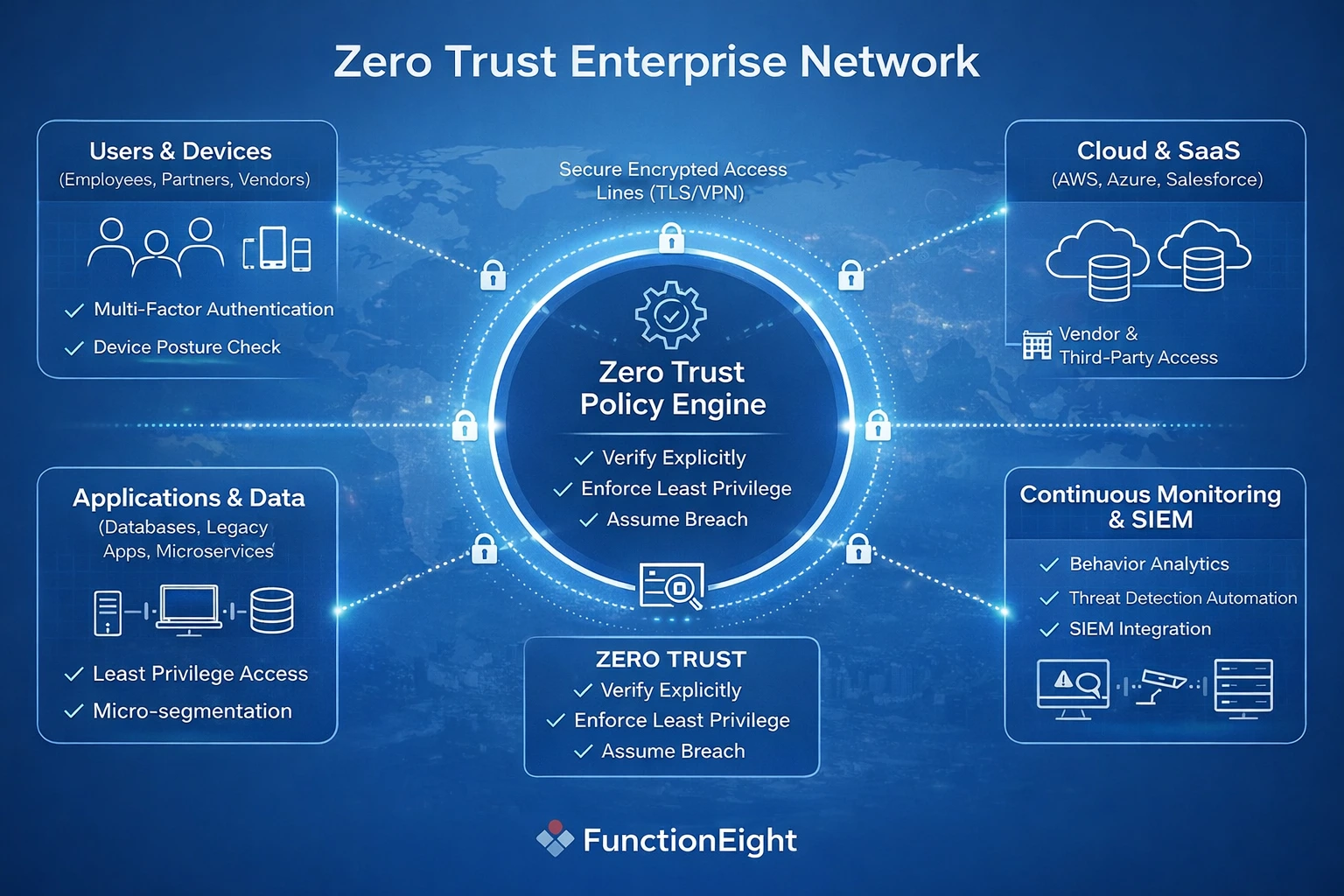
Attackers have adjusted accordingly. The most damaging breaches I see across APAC no longer start with someone breaking through a firewall. They start with compromised credentials, an over-privileged service account, or a contractor connecting from an unmanaged laptop. The perimeter is no longer the front door. Identity, access, and device trust are.
Zero Trust Architecture is a direct response to this shift. It is not a product, a firewall configuration, or something you can buy from a single vendor. It is a security operating model built around one principle: verify every access request, every time, regardless of where it originates.
This guide walks through the steps I follow when helping APAC enterprises move from traditional perimeter-based security toward a working Zero Trust model. The focus is on practical execution, not theory.
Why Zero Trust Has Become a Practical Necessity in APAC
The urgency behind Zero Trust adoption in this region is not abstract. It is driven by patterns that repeat across industries and geographies.
Ransomware continues to hit healthcare and financial services hard. Supply chain attacks have exposed organizations that trusted their vendors implicitly. Phishing campaigns targeting APAC enterprises are more sophisticated and persistent than they were even two years ago. Insider risk, whether malicious or accidental, remains one of the most underestimated threats across the region.
At the same time, regulatory scrutiny is increasing. Singapore's PDPA, Hong Kong's Personal Data (Privacy) Ordinance, and sector-specific requirements in financial services all expect organizations to demonstrate who accessed what, when, and why. Traditional perimeter-based controls make it difficult to answer those questions with confidence.
The perimeter-based model assumes that anyone connected to the corporate network can be trusted. That assumption was already shaky a decade ago. Today, with remote workers, third-party contractors, cloud-hosted applications, and personal devices all connecting to enterprise resources daily, it is untenable.
Zero Trust flips the assumption. Nothing is trusted by default. Every access request, from a user, device, or service, must be authenticated, authorized, and continuously evaluated.
What Zero Trust Actually Means in Practice
Before jumping into implementation, it is worth being precise about what Zero Trust is and what it is not. I run into misconceptions regularly, and they tend to derail projects early.
Zero Trust is built on three operational principles:
Verify explicitly. Every access request is authenticated and authorized based on all available signals: identity, device health, location, behavior, and resource sensitivity. There is no blanket trusted zone.
Enforce least privilege. Users and systems receive only the access they need to do their work. Default-allow policies are replaced with default-deny, and permissions are reviewed regularly.
Assume breach. Design controls as though an attacker is already inside the network. This means monitoring internal traffic, segmenting access, and automating response when anomalies surface.
A misconception that surfaces regularly is the belief that Zero Trust is a product you can purchase or a setting you can enable overnight. It is not. Zero Trust is a coordinated combination of policy, process, and technology changes. Firewalls and VPNs do not disappear. They become components within a broader strategy rather than the strategy itself.
Another misunderstanding is that Zero Trust means blocking everything. The opposite is closer to the truth. When done well, Zero Trust provides the right people with the right access, faster and with greater confidence, because the controls are built into the process rather than bolted on after the fact.

Step 1: Map Your Current Trust Assumptions
Every Zero Trust project I have worked on in the region starts with the same question: where is implicit trust hiding? Most organizations are surprised by the answer.
Implicit trust builds up over time. A subnet that was originally restricted gets opened up for a quick integration project and never gets locked down again. A shared admin account gets created for convenience during a system migration and stays active for years. A vendor connects over VPN and quietly gains access to resources well beyond their scope.
These are not unusual scenarios. They are the norm in most APAC enterprises I assess.
Typical Blind Spots
- Shared administrator accounts with weak or reused passwords, often created during initial setup and never rotated
- Critical business applications or databases accessible to all internal users, regardless of role
- Legacy applications that do not enforce any form of user authentication
- Unmanaged contractor or vendor devices connecting through VPN with broad network access
Each of these represents an access path that Zero Trust needs to address. Missing even one during discovery can leave a significant gap.
An IT security audit is the most effective starting point. A structured audit maps users, devices, applications, third-party services, and existing controls to give the organization a realistic picture of its current state. I have seen Zero Trust projects fail because teams skipped this step and moved straight to deploying tools. Without knowing what needs protection, it is easy to overcomplicate the environment or, worse, leave critical resources exposed.
Step 2: Make Identity the New Security Perimeter
If the security perimeter has dissolved, identity is what replaces it. This step is where most APAC enterprises begin their Zero Trust work, and for good reason. If you cannot reliably verify who is requesting access and from what device, nothing else in the architecture holds up.
Identity in a Zero Trust model means that every access request, regardless of origin, is authenticated and authorized before anything is granted. Multi-factor authentication (MFA) should be standard across all privileged accounts and critical services, not limited to remote logins.
Conditional access policies add another layer of context. These evaluate signals like user location, device compliance state, and behavioral patterns before granting entry. A finance manager logging in from a registered device during business hours gets seamless access. The same account attempting access from a new device in an unfamiliar country triggers additional verification or a block.
Where Identity Programs Stall
In my experience, the most common identity-related weakness is not a lack of MFA. It is the overlooked accounts. Service accounts that run batch processes, shared credentials used across teams, and external vendor accounts with persistent access are the weak points attackers exploit most often.
A pattern that shows up repeatedly: an organization rolls out MFA for all employees but forgets about the dozens of service accounts connecting to databases, APIs, and cloud platforms. Those accounts often have elevated privileges and no second factor. They become the path of least resistance for an attacker.
Regional compliance requirements reinforce the importance of getting identity right. Singapore's PDPA, for example, expects organizations to control and document who accesses personal data. Without strong identity controls, demonstrating compliance becomes difficult.
Operational Practices That Work
- Roll out MFA for all critical services, including administrative and service accounts
- Enforce least privilege by conducting regular access reviews, not just at onboarding
- Require device registration or posture checks before granting access to sensitive resources
- Monitor service account usage and actively phase out shared credentials
These steps are not one-time tasks. Identity controls require ongoing maintenance as roles change, people leave, and new applications come online. Managed IT support plays a significant role here by automating access reviews, synchronizing identity providers with HR systems, and ensuring that changes in the business are reflected in access policies promptly.

Step 3: Segment Access, Not Just Networks
Most APAC organizations are familiar with network segmentation, the practice of dividing infrastructure into subnetworks to limit lateral movement during a breach. It is a sensible control, but Zero Trust takes segmentation further by focusing on access rather than just network topology.
The distinction matters. Network segmentation controls which segments can communicate. Access segmentation controls which specific users, devices, or applications can reach which specific resources, under which conditions. The granularity is fundamentally different.
How ZTNA Changes the Access Model
Zero Trust Network Access (ZTNA) replaces the traditional VPN model of putting users "on the network" with application-level access brokering. Under ZTNA, users authenticate and pass identity and device checks, then receive access only to the specific applications they are authorized to use. Everything else remains invisible to them.
Here is a practical example. An employee in the finance team needs access to the company's accounting platform and a reporting dashboard. Under a traditional VPN, that employee connects to the corporate network and can potentially see file servers, internal wikis, HR systems, and development environments, none of which are relevant to their role.
Under ZTNA, the same employee authenticates, passes a device posture check, and is connected directly to the accounting platform and the dashboard. Nothing else is visible or reachable. If their device falls out of compliance or their role changes, access adjusts automatically.
ZTNA is especially valuable for hybrid environments common across APAC, where some applications live in the cloud and others remain on-premises. Cloud-based ZTNA platforms allow IT to define and enforce access policies centrally, regardless of where the resource sits. For organizations with offices across multiple APAC jurisdictions, this central policy management simplifies what would otherwise be a fragmented approach to access control.
A Common Objection and How to Address It
Teams sometimes push back on ZTNA because they worry it will slow down access or create friction for users. In practice, the opposite tends to happen. Because ZTNA authenticates at the application level and grants access based on policy, users often experience faster, more direct access to the tools they need without the overhead of connecting to a full VPN. The key is designing policies that reflect actual work patterns rather than defaulting to overly restrictive rules that generate help desk tickets.
Step 4: Secure Devices and Endpoints
Knowing who the user is solves only half the problem. You also need confidence in the device they are using. A legitimate user logging in from a compromised, unpatched, or unmanaged device is still a risk, and Zero Trust treats it as one.
Device trust is a particularly important consideration across APAC, where bring-your-own-device (BYOD) policies are widespread. Personal phones, tablets, and laptops routinely connect to enterprise resources. Contractors and third-party partners often use their own hardware, introducing additional variability into endpoint security.
Building Device Trust into Access Decisions
The goal is to integrate device posture checks into the access flow itself, so that a device's compliance status is evaluated every time access is requested, not just at enrollment.
- Verify that devices are running current antivirus software, have encryption enabled, and are up to date with patches
- Use mobile device management (MDM) to enforce baseline security configurations on enrolled devices
- Automatically restrict or block access from non-compliant, jailbroken, or outdated devices
- Integrate device posture checks with identity and access management so that compliance status directly influences access decisions
These controls reduce the risk of a compromised endpoint becoming the entry point for a broader attack. When a device fails a posture check, the user can be prompted to remediate the issue, update their software, or contact IT, rather than being silently granted access despite the risk.
Managed IT support teams often handle the operational burden of maintaining these endpoint checks. Keeping MDM policies current, managing patches across a diverse fleet of devices, and supporting BYOD users who encounter compliance issues all require ongoing attention. Setting clear minimum device standards and providing accessible documentation helps balance security requirements with user productivity, especially in environments where contractors and partners cycle frequently.
Step 5: Apply Continuous Verification and Monitoring
Traditional security models treat authentication as a gate at the front door. Once a user passes through, they are largely trusted for the duration of their session. Zero Trust treats authentication as an ongoing process.
Continuous verification means that every action, request, and behavior is evaluated against a baseline. If a user who normally accesses a handful of files during business hours suddenly begins downloading large volumes of sensitive data at 3 a.m. from an unfamiliar location, that deviation should trigger an automated response, whether that is a step-up authentication challenge, a temporary access restriction, or an alert to the security team.
What Effective Monitoring Looks Like
Behavior-based access decisions evaluate signals like time of day, geographic location, role context, device health, and usage patterns. These signals are compared against established baselines to identify anomalies in near real time.
Effective continuous monitoring relies on several components working together:
- Centralized logging of all authentication events, access requests, and system changes, consolidated into a single view
- SIEM integration to correlate events across sources, identify patterns, and generate alerts on genuine threats
- Automated response workflows that can take predefined actions, like revoking a session or escalating to an analyst, without waiting for manual intervention
- Alert tuning to reduce noise and ensure analysts receive actionable findings rather than a constant stream of low-priority notifications
The last point deserves emphasis. Alert fatigue is one of the most common reasons continuous monitoring fails to deliver value. If the security team receives hundreds of alerts per day and most of them are false positives, the real threats get lost in the noise. Investing time in tuning detection rules, building clear response playbooks, and regularly reviewing alert quality pays off significantly.
What Usually Surprises Organizations
Many enterprises are caught off guard by what continuous monitoring reveals. Users with access far beyond their role. Service accounts communicating with systems they should not reach. Devices that appear compliant on paper but exhibit patterns inconsistent with normal use. These findings are not indicators of malice in most cases. They are symptoms of accumulated implicit trust that was never cleaned up.
Treating these early signals seriously, rather than dismissing them as noise, is one of the most practical benefits of a Zero Trust monitoring approach.
Step 6: Align Zero Trust with Compliance and Risk Requirements
APAC enterprises operate under a range of data protection and security frameworks that align well with Zero Trust principles. Singapore's PDPA, Hong Kong's Personal Data (Privacy) Ordinance, ISO 27001, and SOC 2 all expect organizations to maintain documented access controls, audit logging, and robust authentication.
A concern that comes up occasionally is that Zero Trust will complicate audits by introducing additional layers of control. In practice, the opposite tends to be true. Because Zero Trust creates granular, well-documented access policies with centralized logging, responding to audit requests and demonstrating control effectiveness actually becomes faster.
A Practical Example
Consider an organization that needs to demonstrate compliance with personal data protection requirements. Under a traditional model, showing that only authorized HR staff can access employee records might require pulling access lists from multiple systems, cross-referencing them with role definitions, and hoping nothing has drifted since the last review.
Under a Zero Trust model, the same audit question is answered by the access policy itself: only users in the HR role, authenticated with MFA, on compliant devices, can access the HR application. All access is logged. Deviations trigger alerts. The evidence is already there, structured and ready for review.
Mapping Zero Trust controls to compliance frameworks like ISO 27001 takes effort upfront, but it reduces the ongoing burden of audit preparation and significantly lowers the risk of non-compliance findings.
Step 7: Train People, Not Just Systems
Technology handles the enforcement, but people determine whether Zero Trust works in practice. If users do not understand why access controls exist or how to work within them, resistance and workarounds will undermine the entire effort.
I have seen Zero Trust rollouts stall because employees did not understand why MFA was suddenly required for tools they had used freely for years. IT teams, too, have struggled with new policy management interfaces they were never properly trained on. These are avoidable problems.
Training That Actually Changes Behavior
Security awareness campaigns are a starting point, but targeted cybersecurity training has more impact. Different roles have different questions, concerns, and objections. Tailoring the training to those differences makes it more relevant and more likely to stick.
- System administrators need in-depth walkthroughs of Zero Trust policy configuration, troubleshooting, and exception handling
- Management and executives want to understand how Zero Trust protects the business and what their role is in approving or reviewing high-privilege access
- End users need clear, practical explanations of what has changed, why, and what to do if they encounter access issues
Framing matters. Explaining Zero Trust as "we no longer trust you" creates resistance. Explaining it as "we are making access more secure and more consistent so that the right people can reach the right tools without unnecessary delays" builds buy-in.
Clear communication about new policies, regular feedback channels, and practical examples drawn from the organization's own environment all help bring the workforce along. This culture shift is as important as any technical deployment.
Common Zero Trust Implementation Mistakes in APAC Enterprises
Having worked through Zero Trust projects across the region, the same mistakes come up repeatedly. Across multiple assessments in Singapore and Hong Kong, these patterns repeat regardless of industry. Recognizing them early saves significant time and frustration.
Treating Zero Trust as a product purchase. A vendor may label their solution "Zero Trust," but deploying a single tool does not create a Zero Trust architecture. It requires coordinated changes across policy, process, and technology. Without that coordination, organizations end up with an expensive tool that does not deliver the expected outcomes.
Trying to implement everything at once. Overengineering every control from day one burns out IT teams and generates user complaints that erode support for the initiative. A phased approach that starts with high-value targets and expands incrementally is far more sustainable.
Ignoring legacy systems and shadow IT. Older applications that do not support modern authentication and unapproved tools adopted by individual teams are common across APAC enterprises. They create access paths that bypass Zero Trust controls entirely. Identifying and isolating these systems early in the process is critical.
Failing to communicate. If staff and leadership do not understand what is changing and why, progress slows, and resistance builds. Bringing stakeholders into the process early, explaining the rationale in business terms, and providing clear timelines all reduce friction.
What a Realistic Zero Trust Roadmap Looks Like
Zero Trust is not an overnight switch. It is a phased transition that builds momentum over time. Here is a realistic timeline based on my work with regional enterprises.
First 90 Days: Foundation
- Complete an IT security audit to map trust assumptions, access paths, and control gaps
- Tighten identity management: roll out MFA for all administrative accounts and critical services
- Begin monitoring access to the organization's most sensitive applications and data
- Identify legacy systems and shadow IT that will require special handling
At 6 Months: Expansion
- Deploy ZTNA for remote and third-party access, replacing broad VPN connections with application-level controls
- Begin application-level segmentation for high-value internal assets
- Implement continuous monitoring and automated incident response workflows
- Train core IT and security staff on Zero Trust policy management and daily operations
At 12 Months: Maturity
- Expand segmentation and monitoring to cover all business applications
- Integrate device posture checks across the full device fleet, including BYOD and contractor devices
- Launch ongoing end-user security training with role-specific content
- Review Zero Trust alignment with legal and compliance teams and document controls for audit readiness
Progress is measured by concrete outcomes: a smaller attack surface, fewer excessive access paths, faster incident response times, and higher confidence during audits. Organizations with limited in-house security expertise typically benefit from partnering with experienced consultants or managed IT support providers who can guide the process and handle ongoing operational demands.

Zero Trust as an Operating Model, not a Project
The organizations that get the most value from Zero Trust are those that treat it as a continuous operating model rather than a one-time project with a defined end date.
In practice, this means that every IT and business decision includes an access review step. New applications go through an access policy review before deployment. Employee onboarding includes least-privilege access provisioning from day one. Vendor relationships include access scope and device requirements as part of the contract. Even office relocations or expansions include a review of network and access controls.
When implemented thoughtfully, Zero Trust does not slow the business down. It enables more secure remote work, faster partner onboarding, and a resilient foundation for digital transformation. Over time, it reduces both incident risk and compliance burden without sacrificing the flexibility that APAC businesses need to operate across diverse markets.
Frequently Asked Questions
Is Zero Trust only for large enterprises?
No. Any organization can benefit from core Zero Trust principles. Smaller APAC companies often have simpler networks, which can make phased adoption faster and less complex. The principles of verifying identity, limiting privilege, and monitoring access apply regardless of organization size.
Can Zero Trust work with legacy systems?
Yes, but it often requires additional integration work. Legacy applications that do not support modern authentication can be isolated behind access proxies or wrapped with additional controls. The first step is identifying these systems during the initial audit and placing strict access safeguards around them while a longer-term modernization plan is developed.
How long does Zero Trust implementation take?
Initial improvements can deliver measurable results within the first 90 days. Full adoption typically stretches over 12 months or longer, depending on organization size, environment complexity, and the level of leadership support. The phased approach outlined in this guide is designed to build momentum progressively rather than requiring a single large-scale deployment.
Does Zero Trust replace firewalls and VPNs completely?
Not necessarily. Firewalls remain useful for basic network-level controls. VPNs may continue to serve specific use cases. However, ZTNA replaces VPNs for most remote and third-party access scenarios, and firewalls become one layer within a broader set of controls rather than the primary line of defense.
What is the biggest risk during Zero Trust implementation?
Losing organizational buy-in. The most common reason Zero Trust projects stall or fail is not a technical limitation. It is insufficient communication and training, which leads to user frustration, workarounds, and executive skepticism. Investing in clear communication and targeted training from the start significantly reduces this risk.
Getting Started
For organizations considering a Zero Trust approach, an objective assessment is the most effective starting point. A structured IT security audit identifies where implicit trust exists, maps access gaps, and provides a realistic foundation for planning next steps.
From there, ongoing managed IT support ensures that Zero Trust controls remain effective as the business evolves, while targeted cybersecurity training builds the internal capability needed to sustain the model long-term. FunctionEight works with APAC enterprises to assess, plan, and execute Zero Trust adoption, providing both the technical expertise and the operational support to make it work in practice.